WFH Lounge · Best Picks

Best Keyboards for Working From Home

For most home offices the Logitech Alto Keys K98M is the pick: a quiet, gasket-mounted mechanical with a number pad for about $100. Prefer low, quiet keys? The Logitech Signature Slim K950 costs $80. Want mechanical for less? The AULA F75 is $67.

Mechanical, membrane, and wireless keyboards reviewed.

The 30-Second Answer

Top pick

Logitech Alto Keys K98M Wireless Mechanical Keyboard

Logitech's 2025 gasket-mounted mechanical: smooth hot-swappable linear switches, a 98-key layout with a number pad, multi-device Bluetooth plus Logi Bolt, sold by Amazon for about $100.

Buy on Amazon

Best-value mechanical

AULA F75 75% Wireless Mechanical Keyboard

A gasket-mounted 75% mechanical with hot-swappable, factory-lubed linear switches, a knob and Bluetooth, 2.4 GHz or wired connection for about $67, sold by AULA's own store.

Buy on Amazon

Budget pick

ProtoArc EK02 Wave Keys Ergonomic Wireless Keyboard

A wave-shaped layout with a built-in palm rest and three-device wireless for about $55 - the cheapest keyboard here that changes how your wrists sit.

Buy on Amazon

Skip this

Clicky switches (Blue, Green) in home offices with video calls — Clicky switches are audible on microphones and through walls. Your call participants can hear every keystroke during meetings. Linear or tactile silent switches deliver the mechanical typing experience without the audio disruption.

The shortlist

Find the right pick in 5 seconds

My budget
up to $250
Showing 11 of 11
Logitech Alto Keys K98M Wireless Mechanical Keyboard1

Logitech Alto Keys K98M Wireless Mechanical Keyboard

⭐ Best Value

Logitech's first gasket-mounted, hot-swappable mechanical board in a 98-key compact-with-numpad layout. It is the top pick for WFH typists who want a mechanical feel with Logitech's Easy-Switch, Logi Bolt and Options+ ecosystem; Logitech rates it at up to 12 months per charge with the backlight off, which no page-mate matches.

↑ Keyboard Quality↑ Sound Quality↑ Key Feel
$99.99 Buy on Amazon
Logitech Signature Slim K950 Wireless Keyboard2

Logitech Signature Slim K950 Wireless Keyboard

💰 Best Budget

The quiet, slim full-size pick: laptop-style low-profile keys, a number pad and three-device switching, on two AAA batteries that Logitech rates at up to 36 months. Choose it if you want an office keyboard you never have to charge and that stays quiet on calls.

↑ Keyboard Quality↑ Connectivity↑ Ergonomics
$79.99 Buy on Amazon
AULA F75 75% Wireless Mechanical Keyboard3

AULA F75 75% Wireless Mechanical Keyboard

💰 Best Budget

The cheapest good mechanical here: a gasket-mounted 75% board with hot-swappable, factory-lubed linear switches, a knob and three ways to connect, sold by AULA's own store. It costs well under the Keychrons on this page, at the price of gaming styling and a plastic case.

↑ Keyboard Quality↑ Sound Quality↑ Value For Money
$66.99 Buy on Amazon
Apple Magic Keyboard with Numeric Keypad (White)4

Apple Magic Keyboard with Numeric Keypad (White)

⭐ Best Value

The Mac pick: Apple's own low-profile scissor-key keyboard with a numeric keypad, full-size arrow keys and document navigation keys, rated for about a month or more per charge. This is the version without Touch ID, which is why it costs far less than the Touch ID model.

↑ Keyboard Quality↑ Functionality↑ Connectivity
$109 Buy on Amazon
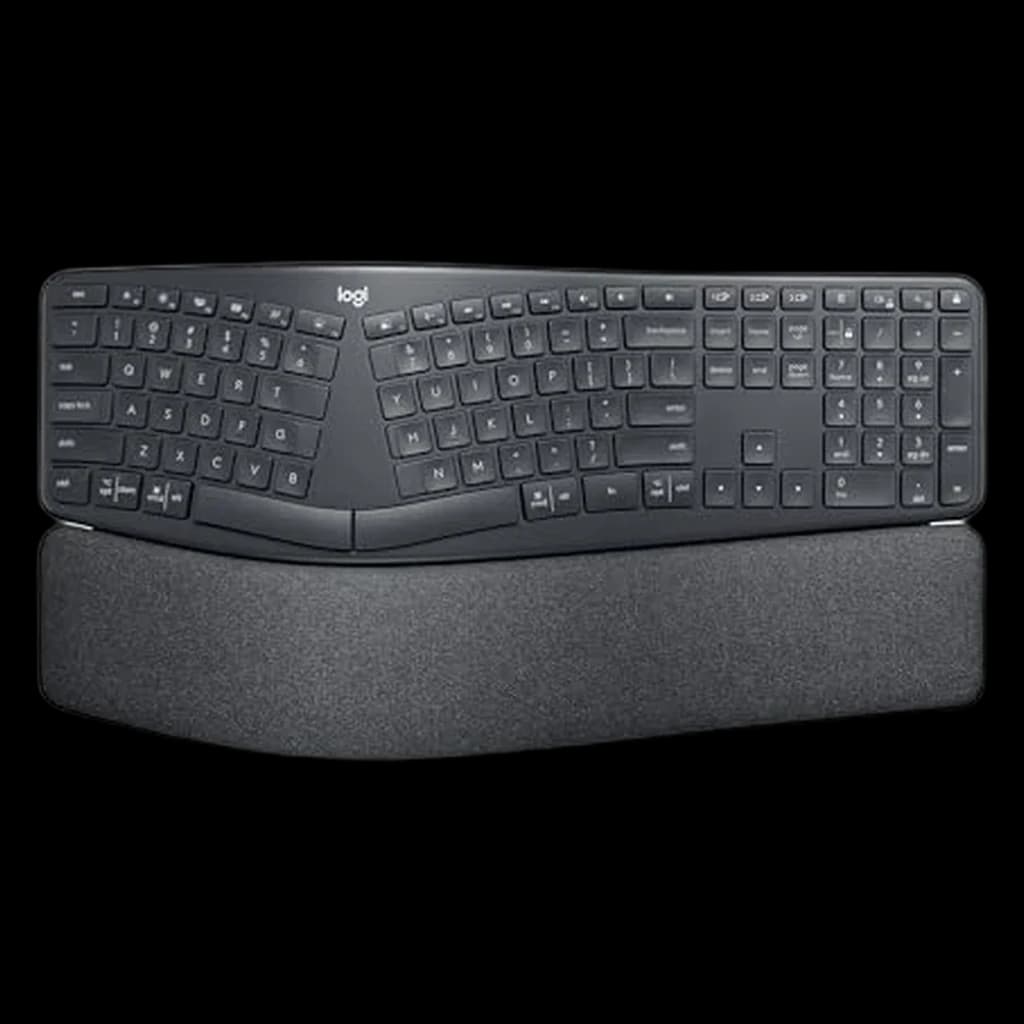
Logitech Ergo K860 Wireless Split Ergonomic Keyboard5

Logitech Ergo K860 Wireless Split Ergonomic Keyboard

⭐ Best Value

The split ergonomic pick: a curved, split keyframe with a cushioned palm rest and a normal QWERTY layout with a number pad. Logitech says its pillowed wrist rest gives 54% more wrist support and reduces wrist bending by 25%; it dates from 2020 but is still the only mainstream split board.

↑ Quality↑ Comfort↑ Ergonomics↓ Reliability↓ Durability
$119.99 Buy on Amazon
✨

Not sure which keyboard is right for you?

Answer 4 quick questions → your match plus two alternatives.

Spec
Logitech Signature Slim K950 Wireless Keyboard#2
#2💰 Best Budget
Logitech Signature Slim K950 Wireless Keyboard
Owner rating
AULA F75 75% Wireless Mechanical Keyboard#3
#3💰 Best Budget
AULA F75 75% Wireless Mechanical Keyboard
Owner rating
Apple Magic Keyboard with Numeric Keypad (White)#4
#4⭐ Best Value
Apple Magic Keyboard with Numeric Keypad (White)
Owner rating
ProtoArc EK02 Wave Keys Ergonomic Wireless Keyboard#6
#6💰 Best Budget
ProtoArc EK02 Wave Keys Ergonomic Wireless Keyboard
Owner rating
Buy

* Prices checked Oct 24, 2026 and may not reflect current rates. As an Amazon Associate I earn from qualifying purchases.

As an Amazon Associate I earn from qualifying purchases. Product prices and availability are subject to change.

What remote workers actually say

Show

What Remote Workers Actually Say

8 of the 11 keyboards on this page launched in 2024 or later, 9 of the 11 have a number pad, and only one, the Keychron Q6 HE 8K, is wired-only.

The usual advice from keyboard enthusiasts for shared rooms and call-heavy days is the same: linear or tactile switches rather than clicky ones, hot-swappable sockets so you can change switches later, and Keychron as a common first step into wireless mechanical boards.

Community favorites

  • Logitech Alto Keys K98M — Logitech's first gasket-mounted mechanical: smooth hot-swappable linear switches, a 98-key layout with a number pad and three-device pairing, sold by Amazon
  • AULA F75 — A gasket-mounted 75% mechanical with hot-swappable switches and three ways to connect for about $67, rated 4.6 stars from 2,696 reviews
  • Logitech Ergo K860 — Still the only mainstream split ergonomic board, and among Amazon's best-selling keyboards six years after launch

Commonly warned against

  • Clicky switches in video call environments — Every keystroke is audible on your microphone, and your call participants will notice before you do
  • Apple Magic Keyboard on Windows — The Command and Option keys and the function row need remapping; buy it for a Mac, iPad or iPhone

The thing most remote workers don’t realize

Show

What we didn’t pick

Show

What we didn't pick

Popular options we evaluated and passed on, with the specific reason each one fell short of our top picks.

  • Keychron Q2 Wired
    Considered 2026-10-19

    A wired 2021 board with two reviews on the variant we linked.

  • Amazon Basics Wired Keyboard
    Considered 2026-10-19

    $11 is under our floor for a work keyboard.

  • Keychron V3 Max TKL Wireless Mechanical Keyboard
    Considered 2026-10-19

    3.8-star rating (38 reviews), ~2024; the Keychron V6 Ultra 8K takes the slot.

  • Logitech MX Keys S Wireless Keyboard
    Considered 2026-10-19

    2023 model; Logitech's 2025 Alto Keys K98M takes the slot.

  • Keychron Q1 Ultra 8K Wireless Mechanical Keyboard
    Considered 2026-10-19

    3.9-star rating; the Q6 Ultra 8K from the same family rates 4.5.

  • Logitech Wave Keys
    Considered 2026-10-19

    4.2-star rating, 2023; the ProtoArc EK02 does the wave-and-palm-rest job at 4.5.

  • Keychron K3 V2 Ultra-Slim Wireless Mechanical Low-Profile
    Considered 2026-10-19

    Superseded by the Keychron K3 Ultra 8K.

  • Logitech Signature K650 Comfort Wireless Keyboard
    Considered 2026-10-19

    2022 model; duplicates the EK02's budget slot.

  • Apple Magic Keyboard with Touch ID and Numeric Keypad (USB-C)
    Considered 2026-10-24

    At about $199 it costs roughly $90 more than the Lightning model we list, for Touch ID and a USB-C port.

How to pick the right one

Show

How to Pick the Right One

Your keyboard is the thing you touch most in a workday, so feel, noise and layout matter more than specs on a box. Decide the layout first: a full-size board with a number pad suits spreadsheets and data entry, while a compact 75% board keeps the arrows and function row and gives your mouse more room. Replacing a board with a dead or doubling key? Our keyboard tester shows which keys have actually failed. Then pick the feel. Low-profile scissor keys (Logitech Signature Slim K950, Apple Magic Keyboard) are quiet and shallow; mechanical switches give more travel and a crisper stop. For video calls, choose linear or tactile switches over clicky ones, which your microphone picks up. If your wrists ache, a wave or split layout with a palm rest changes how your hands sit more than any switch does. Placement matters too: OSHA advises keeping the keyboard at about elbow height with straight wrists, and Cornell's ergonomics guidance favours a keyboard slightly below elbow height, tilted gently away from you. How we picked: most picks here were released in 2024 or later. We kept three older boards on purpose. The Logitech Ergo K860 (2020) is still the only mainstream split keyboard and was Amazon's #5 best-selling keyboard when we checked in October 2026. Apple's Magic Keyboard with Numeric Keypad is a Lightning-era design, kept because it was Amazon's #4 best-selling keyboard. The AULA F75 launched in late 2023; it was Amazon's #36 best-selling keyboard and is the best-value mechanical here.

Related Reading

All guides →
Best Keyboards for Working From Home

Best Keyboards for Working From Home

Seven keyboards for remote work in 2026, from the budget AULA F75 to the wired Keychron Q6 HE 8K. The Logitech Alto Keys K98M is our top pick.

WFH Lounge Editorial
13 min read·March 16, 2026
Best Mechanical Keyboards for Remote Work: Alto Keys K98M

Best Mechanical Keyboards for Remote Work: Alto Keys K98M

Six mechanical keyboards for WFH in 2026. Logitech's Alto Keys K98M is our top pick: gasket-mounted, hot-swappable, up to 12 months per charge.

WFH Lounge Editorial
12 min read·March 10, 2026
Keychron K2 vs K8 (2026): The K2 Wins for Most WFH Desks

Keychron K2 vs K8 (2026): The K2 Wins for Most WFH Desks

Keychron K2 vs K8 for WFH in 2026: the K2's 75% layout wins for most desks; the K8's tenkeyless suits heavy typists. Full side-by-side verdict inside.

WFH Lounge Editorial
5 min read·February 13, 2026